
Let’s reverse engineer a binary #
Reverse engineering, what’s that ? #
Reverse engineering (RE) is a method used to understand how a system or program works without access to its original source code. Here we will focus on software reverse engineering, even if the same principles could apply to a circuit board for example.
As a reminder, compiled languages like Rust or C are compiled into machine code that can be understood by a computer. Assembly is a low-level, human-readable representation of that machine code — though in practice it remains quite hard to read.
Reverse engineering is about taking this machine code and working backwards to produce a higher-level language approximation — this is called decompiling. The tool that does this is called a decompiler. Note that Ghidra actually performs two distinct steps: first disassembling (machine code → assembly), then decompiling (machine code → pseudo-C), which is why you see both views side by side in the interface.
A few tools can be used :
- Ghidra (free): https://ghidra-sre.org
- IDA (paid): https://hex-rays.com/ida-pro
- Binary Ninja (paid): https://binary.ninja
I will be using Ghidra, a software made by the National Security Agency.
Let’s take an example #
As an example, we could use a simple binary, a Pokemon game (for next time 😉) or even a malware or an Android application. As I recently started a CTF on Hack The Box, we’ll be using the FlagCasino challenge from HTB CTF TryOut.
We have a simple binary game, in which you place your bet and the software tells you if you won or not. The goal is to break the bank !
The interface #
Here is the simple interface we are faced with:
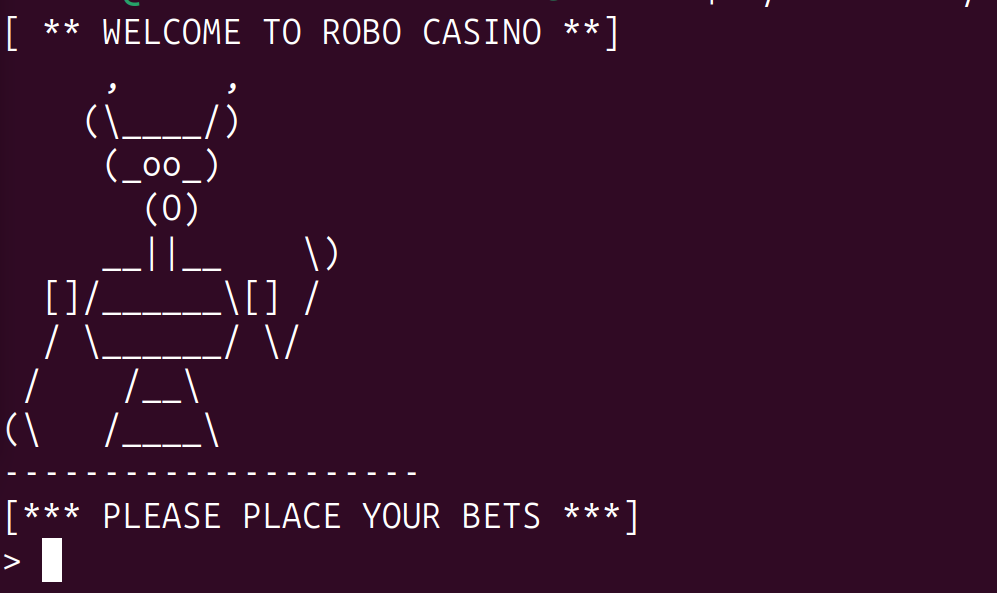
You just need to enter a bet amount. If you enter something, this is what you see:

We could try putting nothing, a character that is not a number but the program doesn’t react.
🔍 Decompilation of the binary #
Here is the Ghidra interface, when we open the file:
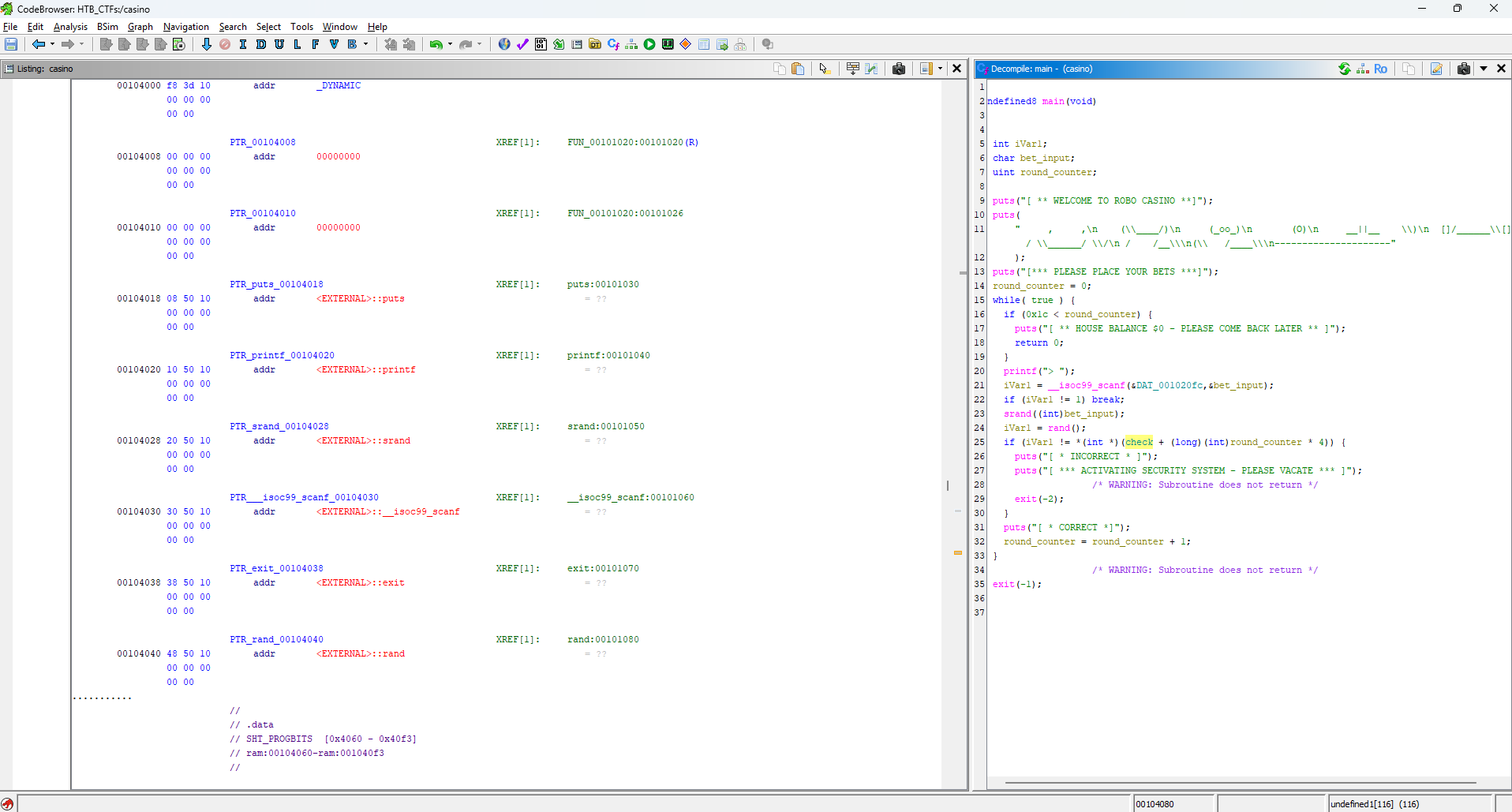
If it’s your first time seeing Ghidra, I know this can be complex (it’s still for me 😅). Just remember that on the left side, you have the assembly code and on the right side the decompilation done by Ghidra.
First we need to find the entrypoint of the program - the function that is executed first.
In Ghidra, we can look for strings that appear in the assembly code. Here is all the strings with more than five characters that Ghidra found:
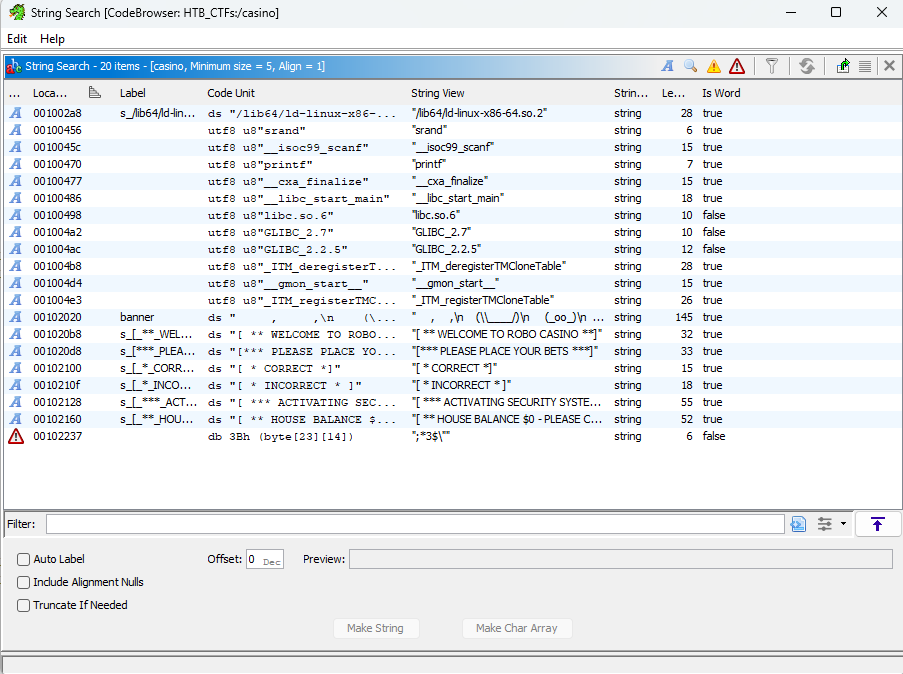
We can see the first text that appears when we start the binary: ** WELCOME TO ROBO CASINO**.
When we click on the text to find it in the assembly (see below), we see that it is cross referenced in the main function at the 0x0010118d address.

And here is the entrypoint: the main function. We can open the decompiled version of this fonction, that will appear on the right side.
The project has to be analyzed for this step to work but Ghidra always ask when you open a new project.
Exploring the generated code #
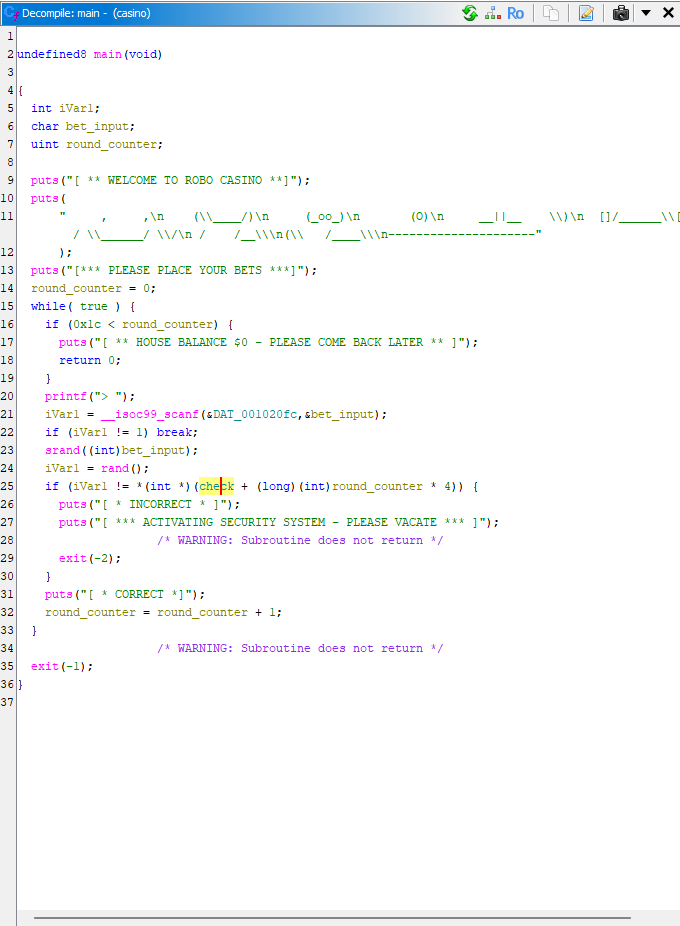
The code is composed of three declared variables (iVar1, local_d, local_c) and a main loop while(true).
When compiling, function and variable names exist as debug symbols. These are typically stripped from the final binary when releasing a program, which is why we end up with generic names like local_c instead of something meaningful.
Now is time to understand what the program is doing:
-
First the program checks if
local_cis greater than0x1c(= 28). We can see that at the bottom,local_cis increased by 1 at every “round”. It looks like iflocal_cis greater than 28, the house has no money anymore — that’s where we want to end up. -
Then we see a
__isoc99_scanf()function. This is a scanf implementation compliant with ISO C99 rules (see documentation). This function reads the bet input and puts it intolocal_dif the format matches the pointer&DAT_001020fc(%c= char in this case). -
If nothing is inputed, the program breaks
-
srandinitializes the C random function with a starting seed value. In our case the seed is our bet input value. (We can rename thelocal_dvariable in Ghidra to simplify our understanding.)
The documentation mentions that “to create the same sequence of results, call the srand function and use the same seed” — see documentation.
-
The program generates a pseudo-random number and puts it in
iVar1. Note thatrand()on Linux returns a non-negative integer between 0 andRAND_MAX(231−1), so the generated value is always positive. -
A check verifies if the generated value is equal to
check[local_c]— if not, we lose. If we find the correct value, it adds 1 tolocal_cand goes back to the beginning of the loop. This means thatlocal_cis a round counter. To break the bank, we need to win all 29 rounds (0 to 28 included).
TL;DR — The program takes your bet as the seed for a rand() function whose output needs to match the value in the check array for each round.
First idea #
My first idea was to develop a program that would test every possible bet, check stdout for a [* CORRECT *] message, save the current bet used and restart for the next round.
import subprocess

def main():
    round = 0
    while(round != 29):
        for input in range(0,254):
            if round == 0:
                proc = subprocess.Popen(["../Downloads/rev_flagcasino/casino"], stdin=subprocess.PIPE, stdout=subprocess.PIPE)
                proc.poll()
                (print(proc.stdout.readline().decode()) for i in range(0,11))
                proc.stdin.write((chr(input) + "\n").encode("utf-8"))
                proc.stdin.flush()
                if "INCORRECT".encode("utf-8") not in proc.stdout.readline():
                    print("input =", input) round +=1 break
                else:
                    round = 0 print(round)

if __name__ == "__main__":
main()This program is not working in its current state — it was late at night and I was struggling to handle the rounds given that the program exits on every wrong input.
One important thing I discovered from this is that the program takes input as a char and not as an integer (%c from before). The char type in C can store values from -128 to 127 and is usually used to store a single letter.
In the code, local_d/bet_input is interpreted as an int in the srand() function. We can replicate what happens with an example:
int main(int argc, char *argv[])
{
    char letter = 'A';
    printf("%d\n", letter); // Here we print the char letter as an integer (ASCII value)
    return 0;
}

// Output: 65 (see [https://www.ascii-code.com/](https://www.ascii-code.com/))
Example from yard.onl
TL;DR — local_d/bet_value can be any value in the ASCII table (letters, numbers, special characters). The range tested in the previous script is therefore not sufficient.
Second idea #
Looking again at the decompiled code, I thought about the correct values in the check array that we need to match. Let’s check out that array, shall we?
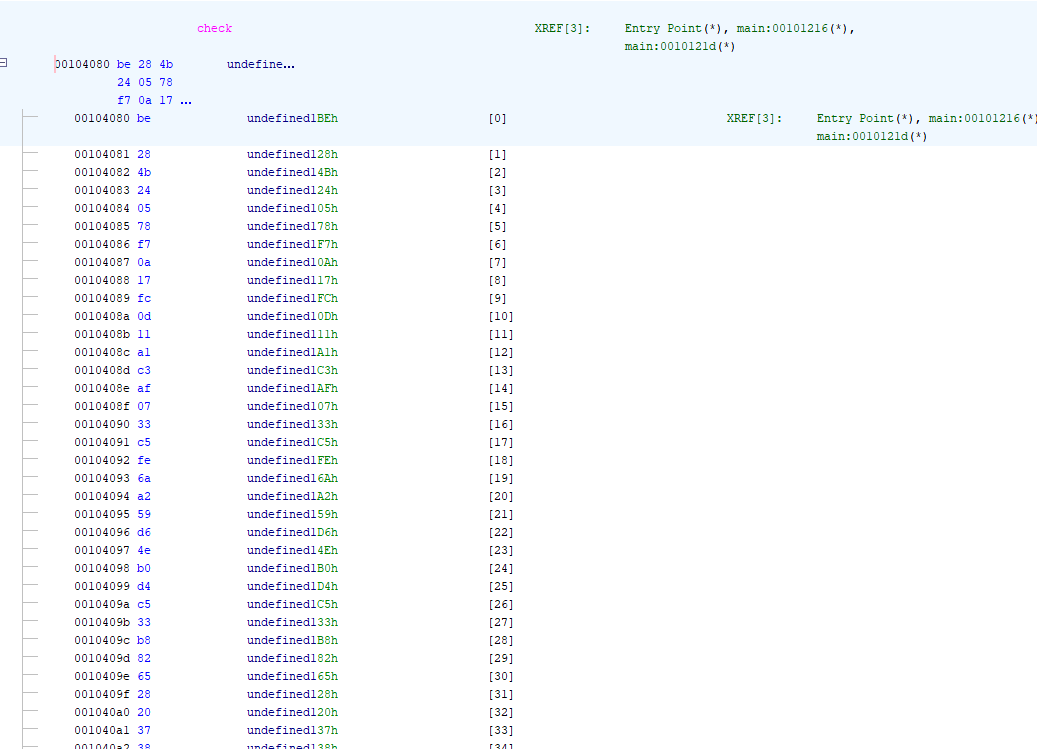
We do have access to the expected values of the array. But what exactly are we looking at?
- We compare a value from the
checkarray with the output ofrand(), which returns anint— and integers are 4 bytes long.
So is check[0] equal to be 28 4b 24?
- After some research, I found out that this was wrong because x86 processors use little endian.
Little endian vs big endian: little endian is a byte ordering in which the first byte stored is the least significant one. In practice, this means we need to read the bytes in reverse order.
- So we just need to convert the hexadecimal value
24 4b 28 beto decimal.
For example, the first 4 bytes 24 4b 28 be give us 608905406.
Replicating this for all bytes gives us 29 values in total!
So the second idea is to replicate what the binary does:
srand((int)bet_value)
rand()
And compare each result with the check array. Here is the script:
import ctypes

libc = ctypes.CDLL("libc.so.6")

check = [
    608905406,
    183990277,
    286129175,
    128959393,
    1795081523,
    1322670498,
    868603056,
    677741240,
    1127757600,
    89789692,
    421093279,
    1127757600,
    1662292864,
    1633333913,
    1795081523,
    1819267000,
    1127757600,
    255697463,
    1795081523,
    1633333913,
    677741240,
    89789692,
    988039572,
    114810857,
    1322670498,
    214780621,
    1473834340,
    1633333913,
    585743402,
]

for round in range(len(check)):
    for input in range(0,256):
        libc.srand(ctypes.c_uint(input).value )
        value = libc.rand()
        if value == check[round]:
            print(input)
As we said before, the character passed into srand is interpreted as its ASCII value.
We test every possible value (0 to 255) with a loop, and for each round check if the
generated number matches the expected value in the check array.
This gives us a list of ASCII values that, once converted to characters, reveal the flag — meaning we just need to enter one character per round in the correct order to break the bank!
Wrapping up #
This challenge taught me a few things:
- “Random” is never truly random — if you control the seed, you control the output.
srandwith the same seed will always produce the same sequence. - Data types matter more than you think — a single
%cinstead of%din a scanf call completely changed our approach and the range of values we had to test - Little endian byte order can trip you up when reading raw values from a decompiler — always double check the byte order before converting hex values to decimal
- When brute force feels wrong, step back and look at the data — the
checkarray was sitting right there the whole time